
The HandSensor Component
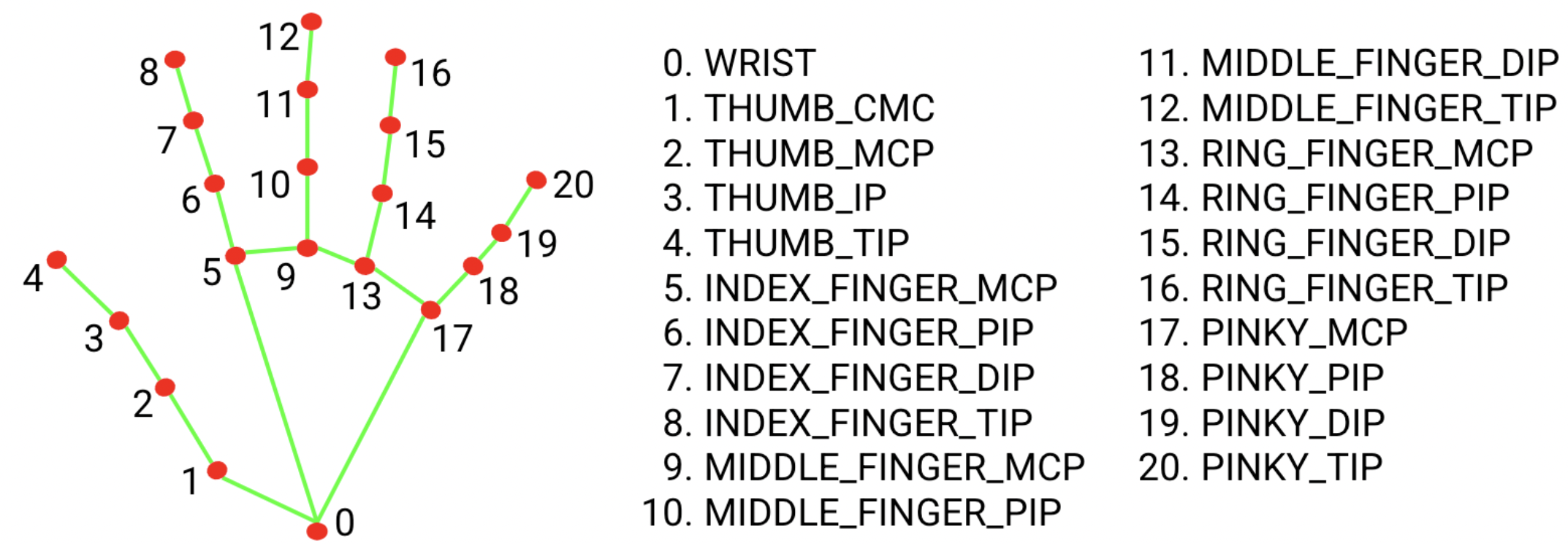
The HandSensor component facilitates the detection of hands using the webcam. It captures webcam video, identifies hand landmarks, and provides updated data on detected hands (position, gestures). Users can set callback functions to receive updates on hands and manage the preview display.
Starting Hand Detection#
To begin detecting hands, use the start method. You can specify an optional frequency (in milliseconds) and an optional camera ID.
Protobject.HandSensor.start(200, 0); // Detects hands every 200 ms using camera ID 0
Handling Hand Data#
To handle hand data, set a callback function using the onData method. This function will be called with hand data whenever there are updates.
Protobject.HandSensor.onData((data) => {
    console.log("Hand Data: ", data);
});
Showing Hand Preview#
To enable the display of detected hands on a canvas, you can add a method to handle the preview. For example:
Protobject.HandSensor.showPreview({ top: 50, left: 50, width: 640, height: 480 });
The preview shows two yellow rectangles at the positions (0.1, 0.1) to (0.9, 0.9) and (0.2, 0.2) to (0.8, 0.8), which can be used to calibrate the video coordinates to real-world objects.
Hiding Hand Preview#
To hide the hand preview canvas, you can use a method to do so. For example:
Protobject.HandSensor.hidePreview();
Flipping the Preview#
To flip the preview display (for mirror-like effect), you can use the flip method:
Protobject.HandSensor.flip(true); // set to true to enable flipping
More information: